
Spatial Coherence#
Coherent light (e.g. a laser) is described by a single complex field \(\psi(x,y)\).
Partially coherent light (LEDs, thermal sources, or spatially filtered broadband sources)
requires a statistical description: the mutual coherence function.
SpatialCoherence provides this, enabling physically accurate simulation
of sources that cannot be modeled by a single wavefront.
Mutual Coherence Function#
The mutual coherence function encodes the statistical correlation between two spatial points:
The diagonal \(\Gamma(x, y, x, y) = I(x, y)\) gives the time-averaged intensity. Fully coherent light has \(\Gamma = \psi^* \psi^\top\); incoherent light has \(\Gamma(x_1,y_1,x_2,y_2) = 0\) whenever \((x_1,y_1) \neq (x_2,y_2)\).
SpatialCoherence stores \(\Gamma\) as a 4D complex tensor of
shape (H, W, H, W). Calling visualize() displays the
time-averaged intensity \(I(x,y) = \Gamma(x,y,x,y)\).
Note
The (H, W, H, W) coherence matrix scales as \(O(N^4)\) in memory. Keep grid sizes
small (typically 20–50 points per dimension) or use GPU acceleration for larger problems.
Creating a SpatialCoherence Object#
The torchoptics.profiles module provides two functions for constructing common coherence
models.
gaussian_schell_model() produces a source with Gaussian intensity
and Gaussian coherence:
where \(I(x,y) = \frac{2}{\pi w^2}\exp(-2r^2/w^2)\) is the Gaussian intensity with waist \(w\) (normalized to unit power), and \(\sigma_c\) is the coherence width: the length scale over which the field remains correlated. A small \(\sigma_c\) (much less than \(w\)) gives a low-coherence source like an LED; a large \(\sigma_c\) approaches a coherent Gaussian beam:
import torchoptics
from torchoptics import SpatialCoherence, visualize_tensor
from torchoptics.profiles import gaussian_schell_model

torchoptics.set_default_spacing(10e-6)
torchoptics.set_default_wavelength(700e-9)

low_coh = SpatialCoherence(
    gaussian_schell_model(30, waist_radius=40e-6, coherence_width=10e-6)
)
high_coh = SpatialCoherence(
    gaussian_schell_model(30, waist_radius=40e-6, coherence_width=1e-3)
)

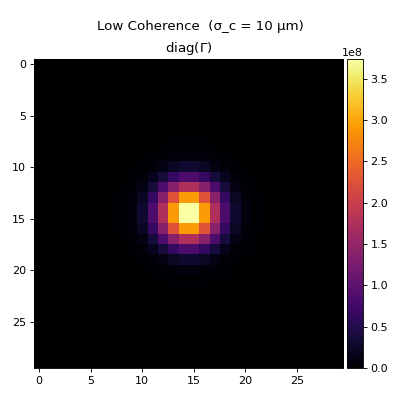
low_coh.visualize(title="Low Coherence  (σ_c = 10 µm)")
high_coh.visualize(title="High Coherence (σ_c = 1 mm)")
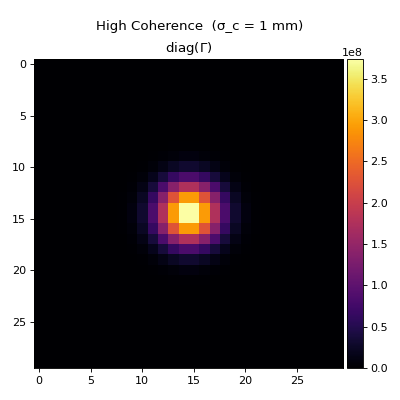
Both sources have the same Gaussian intensity profile; coherence width does not affect the initial intensity distribution, only how the field evolves on propagation.
For custom intensity and coherence shapes, use schell_model() with
callable profiles:
import torch
from torchoptics.profiles import schell_model

data = schell_model(
    shape=30,
    intensity_func=lambda x, y: torch.exp(-2 * (x**2 + y**2) / (40e-6)**2),
    coherence_func=lambda dx, dy: torch.exp(-(dx**2 + dy**2) / (2 * (20e-6)**2)),
)
custom_coh = SpatialCoherence(data)
Propagation#
Propagation of the coherence function follows \(\Gamma' = U\,\Gamma\,U^\dagger\), where \(U\) is the free-space propagation operator. The same API as coherent fields is used:
propagated = low_coh.propagate_to_z(0.01)
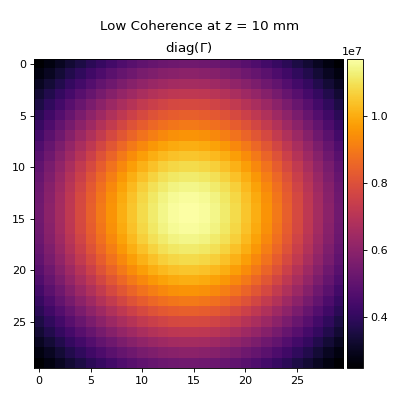
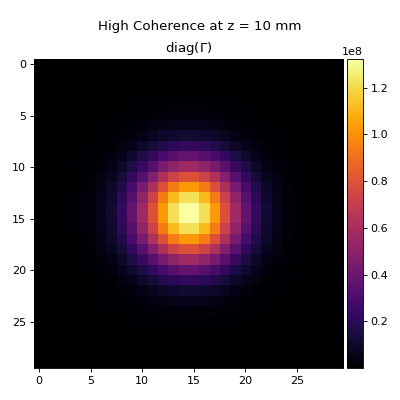
A low-coherence source spreads and loses spatial structure rapidly, while a high-coherence source maintains its beam profile:
low_coh.propagate_to_z(0.01).visualize(title="Low Coherence at z = 10 mm")
high_coh.propagate_to_z(0.01).visualize(title="High Coherence at z = 10 mm")
Intensity, Power, and Modulation#
intensity() returns the diagonal of \(\Gamma\) as a
(H, W) tensor; power() integrates it:
I = low_coh.intensity()  # shape (H, W)
P = low_coh.power()      # scalar
Scalar modulation applies a complex mask \(\mathcal{M}(x,y)\) to the coherence function:
from torchoptics.profiles import circle

apertured = low_coh.modulate(circle(30, radius=100e-6))